> ## Documentation Index
> Fetch the complete documentation index at: https://opentouter.ai/docs/llms.txt
> Use this file to discover all available pages before exploring further.
# Arize AX
> Send traces to Arize AX
[Arize AX](https://arize.com) is an evaluation and observability platform developed by Arize; it offers tools for agent tracing, evals, prompt optimization, and more.
## Step 1: Get your Arize AX credentials
In Arize AX, navigate to your space settings to find your API key and space key:
1. Log in to your Arize AX account
2. Go to **Space Settings** to find your Space Key
3. Go to **API Keys** to create or copy your API key
4. Note the Project Name you want to use for organizing traces
## Step 2: Enable Broadcast in OpenRouter
Go to [Settings > Observability](https://openrouter.ai/settings/observability) and toggle **Enable Broadcast**.
 ## Step 3: Configure Arize AX
Click the edit icon next to **Arize AX** and enter:
* **Api Key**: Your Arize AX API key
* **Space Key**: Your Arize AX space key
* **Project Name**: The name of the tracing project in Arize AX
* **Base Url** (optional): Default is `https://otlp.arize.com`
## Step 4: Test and save
Click **Test Connection** to verify the setup. The configuration only saves if the test passes.
## Step 5: Send a test trace
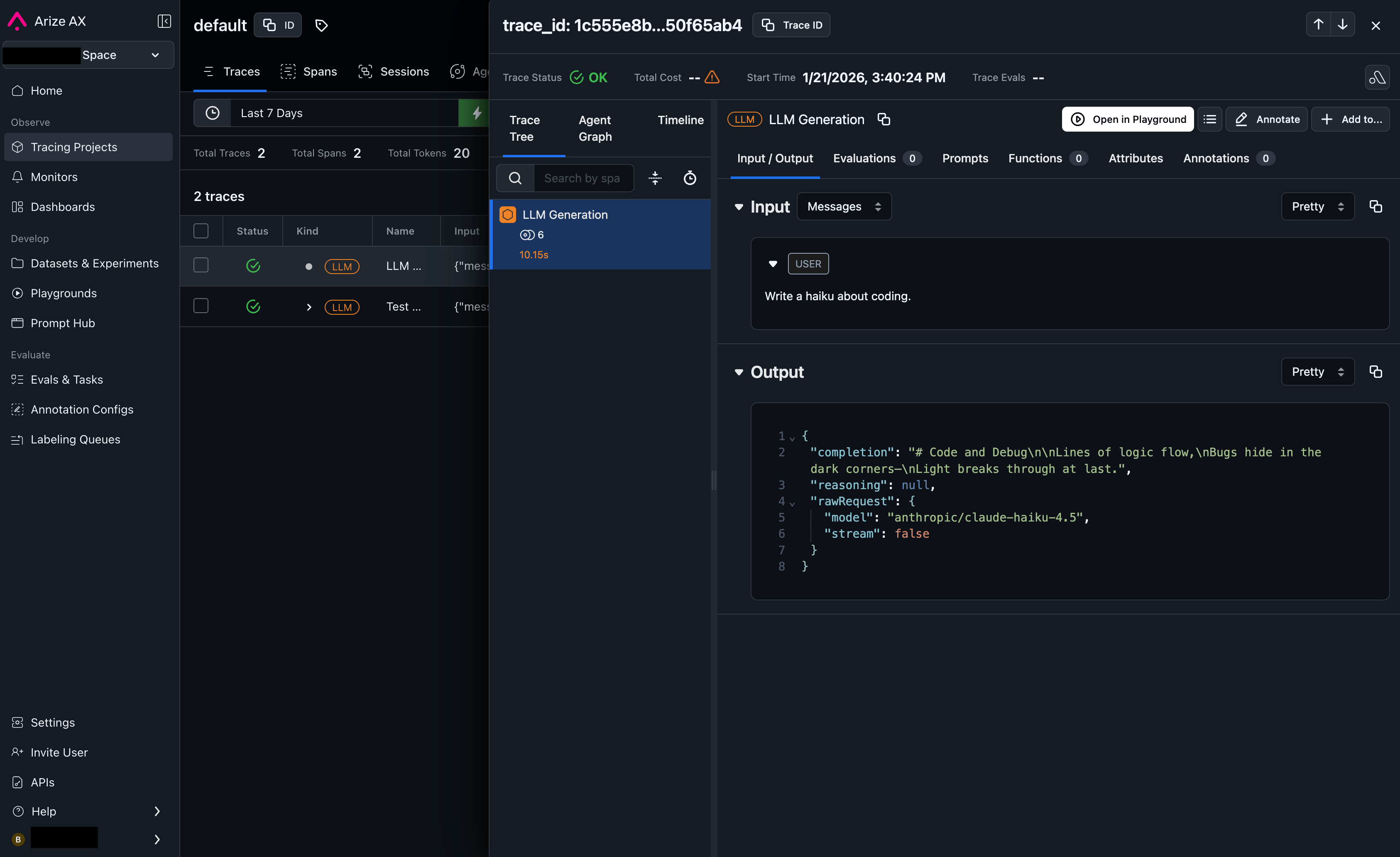
Make an API request through OpenRouter and view the trace in your Arize AX
dashboard under the specified project.
## Step 3: Configure Arize AX
Click the edit icon next to **Arize AX** and enter:
* **Api Key**: Your Arize AX API key
* **Space Key**: Your Arize AX space key
* **Project Name**: The name of the tracing project in Arize AX
* **Base Url** (optional): Default is `https://otlp.arize.com`
## Step 4: Test and save
Click **Test Connection** to verify the setup. The configuration only saves if the test passes.
## Step 5: Send a test trace
Make an API request through OpenRouter and view the trace in your Arize AX
dashboard under the specified project.
 ## Custom Metadata
Arize AX uses the [OpenInference](https://github.com/Arize-ai/openinference) semantic convention for tracing. Custom metadata from the `trace` field is sent as span attributes in the OTLP payload.
### Supported Metadata Keys
| Key | Arize Mapping | Description |
| ----------------- | -------------- | ------------------------------------------------ |
| `trace_id` | Trace ID | Group multiple requests into a single trace |
| `trace_name` | Span Name | Custom name for the root trace |
| `span_name` | Span Name | Name for intermediate spans in the hierarchy |
| `generation_name` | Span Name | Name for the LLM generation span |
| `parent_span_id` | Parent Span ID | Link to an existing span in your trace hierarchy |
### Example
```json lines theme={null}
{
"model": "openai/gpt-4o",
"messages": [{ "role": "user", "content": "Classify this text..." }],
"user": "user_12345",
"session_id": "session_abc",
"trace": {
"trace_id": "classification_pipeline_001",
"trace_name": "Text Classification",
"generation_name": "Classify Sentiment",
"dataset": "customer_feedback",
"experiment_id": "exp_v3"
}
}
```
### Additional Context
* Custom metadata keys from `trace` are included as span attributes under the `metadata.*` namespace
* The `user` field maps to user identification in span attributes
* The `session_id` field maps to session tracking in span attributes
* Token usage, costs, and model parameters are automatically included as OpenInference-compatible attributes
## Privacy Mode
When [Privacy Mode](/guides/features/broadcast#privacy-mode) is enabled for this destination, prompt and completion content is excluded from traces. All other trace data — token usage, costs, timing, model information, and custom metadata — is still sent normally. See [Privacy Mode](/guides/features/broadcast#privacy-mode) for details.
## Custom Metadata
Arize AX uses the [OpenInference](https://github.com/Arize-ai/openinference) semantic convention for tracing. Custom metadata from the `trace` field is sent as span attributes in the OTLP payload.
### Supported Metadata Keys
| Key | Arize Mapping | Description |
| ----------------- | -------------- | ------------------------------------------------ |
| `trace_id` | Trace ID | Group multiple requests into a single trace |
| `trace_name` | Span Name | Custom name for the root trace |
| `span_name` | Span Name | Name for intermediate spans in the hierarchy |
| `generation_name` | Span Name | Name for the LLM generation span |
| `parent_span_id` | Parent Span ID | Link to an existing span in your trace hierarchy |
### Example
```json lines theme={null}
{
"model": "openai/gpt-4o",
"messages": [{ "role": "user", "content": "Classify this text..." }],
"user": "user_12345",
"session_id": "session_abc",
"trace": {
"trace_id": "classification_pipeline_001",
"trace_name": "Text Classification",
"generation_name": "Classify Sentiment",
"dataset": "customer_feedback",
"experiment_id": "exp_v3"
}
}
```
### Additional Context
* Custom metadata keys from `trace` are included as span attributes under the `metadata.*` namespace
* The `user` field maps to user identification in span attributes
* The `session_id` field maps to session tracking in span attributes
* Token usage, costs, and model parameters are automatically included as OpenInference-compatible attributes
## Privacy Mode
When [Privacy Mode](/guides/features/broadcast#privacy-mode) is enabled for this destination, prompt and completion content is excluded from traces. All other trace data — token usage, costs, timing, model information, and custom metadata — is still sent normally. See [Privacy Mode](/guides/features/broadcast#privacy-mode) for details.